Safety
Lost or Stolen Phone Abroad: What to Do, Step by Step
Losing your phone abroad cuts off maps, payments and log-ins at once. Locate and lock it, suspend your line, protect accounts, get a police report and keep traveling.

Published · Updated
The order: locate, lock, suspend
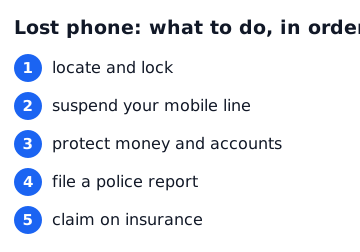
When your phone goes missing, two things matter most: finding out where it is, and stopping anyone from getting into your accounts and payments. The usual order is locate and lock, suspend your mobile line, protect money and accounts, file a police report, then claim on insurance.
If you think it was stolen, don't try to retrieve it alone. Even if you can see its location, go with the police if it is somewhere unfamiliar.
Step 1: locate and lock it from another device
Use a friend's phone or a computer at your accommodation to sign in to your device-finding service: Find My (iCloud) for iPhone or Find Hub (Google account, formerly Find My Device) for Android. You can see the last known location, play a sound and turn on lost mode, which locks the screen and shows a contact message.
Erasing the phone remotely protects your data but may stop you from seeing its location. Use it as a last resort. These features only work if they were switched on before you lost the phone.
Step 2: suspend your SIM with your carrier
Report the loss to your mobile carrier and suspend the line. An active SIM or eSIM lets someone receive your text-message codes and reach your accounts. Most carriers can be contacted from abroad by phone or through their website, so note how before you travel.
If you were using a local or travel SIM or eSIM, tell that provider too. A suspended home number can usually be restored later with a replacement SIM.
Step 3: protect payments, banking and accounts
If your phone had cards in a mobile wallet or banking apps, contact your bank or card issuer to freeze cards or block payments. From another device, change your email, cloud and messaging passwords and sign the lost phone out of your accounts.
If you only receive two-factor codes by text message, you may be locked out without the phone. Saving backup codes from your authenticator app before you travel helps a lot.
- Report lost cards to your bank (the number is on the back of your card; note it beforehand)
- Change email and cloud passwords
- Sign out of messaging and social apps on other devices
- Suspend mobile wallet payments
Step 4: get a police report
If it was stolen, report it at the nearest police station and ask for a written report or reference number; insurers usually need it. Knowing the model and its IMEI number makes the report more precise. You can find the IMEI on the phone's box or your carrier account.
If language is a barrier, ask your accommodation for help. For urgent assistance, contact your country's embassy or consulate; many have a 24-hour emergency line.
Keep traveling without your phone
Flight and hotel confirmations can be retrieved from your email. Use a computer at your accommodation to print or photograph what you need, and always sign out of shared computers.
If you have a long way to go, a cheap local phone with a prepaid SIM can be worth it. Reinstall maps, translation and transport apps, then sign in to restore photos and contacts from your cloud backup.
Five minutes of preparation before you go
A lost phone is much easier to handle if you prepare. Check the list below. Travel insurance often covers theft but not items that were simply lost, so read your policy.
- Turn on device finding and set a screen lock (passcode or biometrics)
- Back up photos and contacts to the cloud
- Save two-factor backup codes
- Keep your carrier's and bank's lost-card contacts and a passport copy on paper and in email
- Use a strap or an inside pocket in crowded places
Services mentioned in this article
Affiliate links. You book on each company’s official site — OneWorld never takes payment.
FAQ
Can I find my phone if it's switched off?
Depending on the device and settings, you may only see its last known location, or none at all. That's why turning on device finding before you travel matters.
Do I really need to suspend my SIM?
Yes. An active SIM lets someone receive your text-message codes. The suspension can be lifted later.
Will insurance pay for a lost phone?
It depends on the policy. Theft with a police report is often covered, but many policies exclude items that were simply lost. Check the terms.
Where do I find my IMEI?
On the phone's box, in your carrier account, or in the device details of your device-finding account. Note it before you travel.
Related reading
 SafetyLost Passport or Emergency Abroad: Step-by-Step What to DoLost passport, stolen cards or a hospital visit abroad: police, embassy steps, emergency…TipsTravel Insurance Checklist: Coverage That Matters, Exclusions and How to ClaimDo you need travel insurance? What coverage matters most, how to read the exclusions,…
 ComparisoneSIM vs Pocket Wi-Fi vs Roaming vs Local SIM: Which Travel Data Option Wins?Compare the four ways to get mobile data abroad by cost, setup and trade-offs, plus how…